TIL: Mind Your `field_with_errors` In Rails
I was happily coding my RSS Feed reader, grabbing screenshots, taking notes when I suddenly found a wild bug:
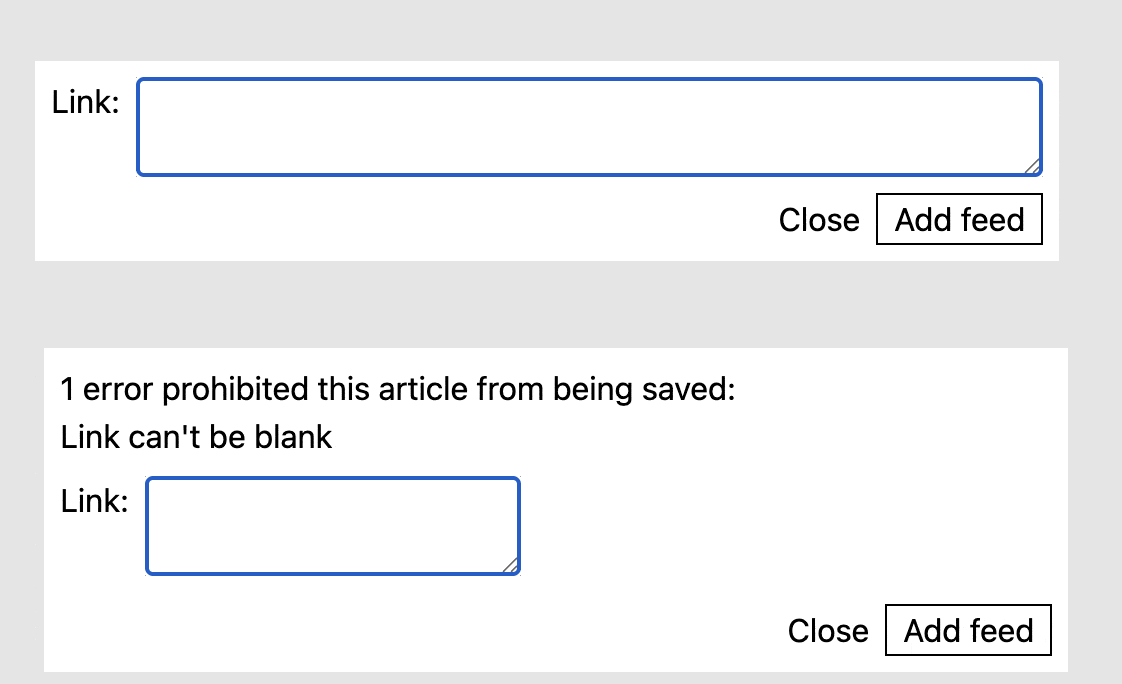
Did you see that text area collapse? Yeah, me too. And I didn’t like it. The thing is, I just couldn’t figure why it was happening. But first, some background.
What am I using anyway?
In order to understand any bug, the first thing we need to clarify is what we’re doing. In the case of HTML and CSS, what markup and what styling are we using explicitly. These inform what is the expected behavior.
In my case, I use TailwindCSS and my HTML looks like so:
<div class="flex gap-2 justify-items-stretch">
  <%= f.label :link, "Link:" %>
  <%= f.text_area :link, autofocus: true, class: "grow border" %>
</div>
What this means is that the text area should grow to fill all the available space of the div. Now, that div is itself inside a flex container, the form:
<%= form_with model: feed, local: true, class: "flex flex-col gap-2 w-full" do |f| %>
  ...
  <div class="flex gap-2 justify-items-stretch">
    <%= f.label :link, "Link:" %>
    <%= f.text_area :link, autofocus: true, class: "grow border" %>
  </div>
  <div class="flex gap-2 justify-end">
    ...
  </div>
<% end %>
The w-full class tells it to fill the full width of it’s container, which happens to be the dialog element, where it’s inserted as a partial:
<dialog id="my-dialog" class="m-auto p-2 w-lg" data-controller="add-feed-modal">
  <%= render "form", feed: Feed.new %>
</dialog>
And the dialog has the w-lg class. All this just to drive home that my intention was that the text area be as wide as it can respecting its container’s padding, etc.
:What
The actual behavior
As can be seen by my beatiful gif, that wasn’t the actual behavior. At first, I thought I wasn’t using the right classes. Then, I turned to my controllers, however, as far as turbo and Rails were concerned, my status was correct, my response’s media type was the expected one when using turbo frames and, in fact, the frame was getting replaced with the form partial but with the errors appropriately handled. And then, inspecting the html, I saw this:
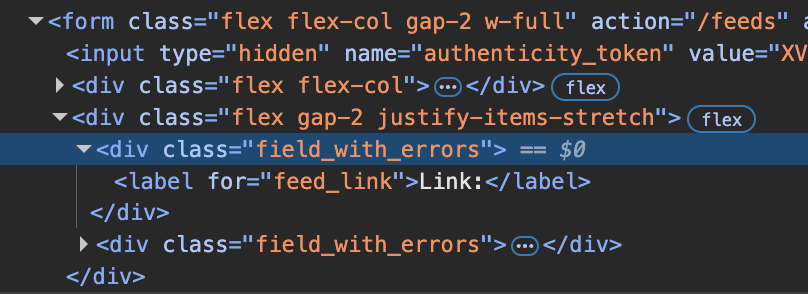
I won’t describe my mental process to go from this div to finding the origin of the solution because although I went through the various stages of “Hmm?”, “Wait, I think I’ve seen that somewhere”, “Lemme ask google how to properly handle errors in Rails views”, after reading a few pages in the guides and some documentation, the issue was clear.
What happens is that the form_with helper automatically gives you those wrapper divs if the model given has any errors. You basically get some styling for free and, furthermore, if you want to customize these wrappers, but more on that in a bit.
The problem arises because the class I was using to make my text area grow to the size of it’s container, was no longer being contained by a flex box. The div added by rails never got expanded to the full width of its containing div and so, visually, the text area collapses.
What can be done?
It turns out, that the only way to do what I intended, i.e.: make an item inside a flex container grow to fill all available space it has, is using the grow class. It may be that I’m unaware of some other method, if so, please do drop me an email or something, because I’d like to know.
At any rate, I found an option that was more to my liking precisely because I want to eventually have more control of how errors are displayed: customize the wrapper divs via an initializer in Rails. Or, in my case, remove them altogether. It’s pretty simple and you can read all about it here in the guides.
Basically, all you need is to add an initializer called, say, field_with_errors.rb and then open the following block:
ActionView::Base.field_error_proc = proc do |html_tag, instance|
  # Style the html_tag here, wrap it in a div, whatever floats your boat
end
In my case I just didn’t want the hassle so all I did was return the original html tag:
ActionView::Base.field_error_proc = proc do |html_tag, instance|
  html_tag.html_safe
end
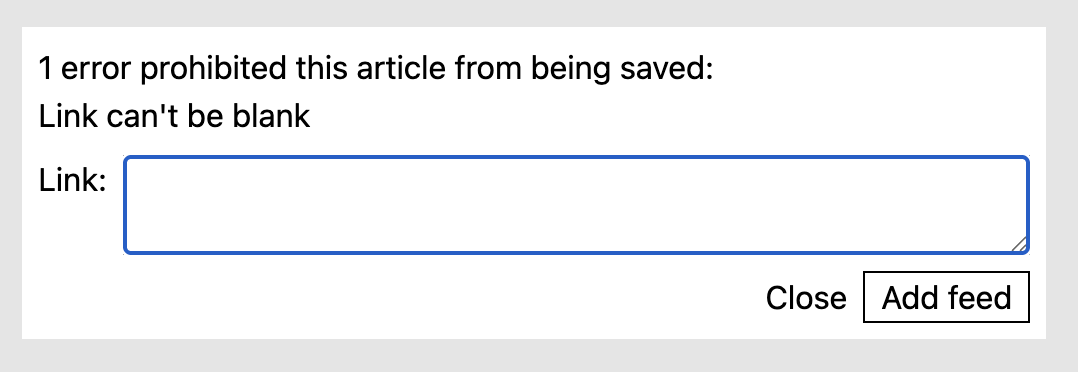
And now I get the styling I expected:
Conclusion
In general, always split your bugs in expected behavior and actual behavior. Enumerate all the external libraries and the code you’re using that you think provides the intended outcome. Make sure it actually does that. Once that’s ruled out, try to find out what is being changed in your code at runtime that is breaking your assumptions.
With HTML, CSS and Rails form helpers, read documentation, inspect the page and study the actual HTML you get and compare it to the HTML you thought should be there. Study your CSS framework’s documentation and also double check that that is also getting to the client browser as expected. Finally, make sure you aren’t getting any extra wrapper divs around your fields breaking your flow.
That’s all I have for now. Hope you learned something useful out of this super specific thing I found.